
Docs Start here
Quickstart: give an agent a Card
Give one agent a KIFF Card and watch KIFF check its calls against it. You connect a tool, issue the Card, point the agent at KIFF, and answer the first call that goes over the limit. No code, about ten minutes.
You need:
- an account at app.kiff.dev (free);
- an agent that can use a remote MCP server, such as Claude Code or Codex;
- a remote MCP server at a public HTTPS address. Any public one works to try it.
Already run an agent in your own code instead, with a framework such as LangGraph or the OpenAI Agents SDK? See Connect an agent for kiff-guard. The Card works the same way.
1. Say who the account is for
The first time you sign in, KIFF asks Who is this account for?
- For me: your own agents and tools. You see My Cards, My agents, Connected tools, Needs you and Activity.
- For a company: the full workspace, with domains, contracts and API keys as well.
It changes what you see, not what KIFF does. You can change it later in Settings → Dashboard view.
2. Connect a tool
Open Connected tools and choose Connect a tool.
- Enter the server’s URL and, if it needs one, its bearer credential. KIFF lists the server’s tools. Nothing is saved yet.
- Choose the tool, the name your agent will see, and whether the tool only reads. If the tool takes a whole-number amount, choose it, so a Card can limit amounts as well as calls.
KIFF stores the credential encrypted and never shows it again. To keep the key away from KIFF, the tool can check a permit KIFF signs instead: Change who holds the key on the tool, and see Tools that check KIFF.
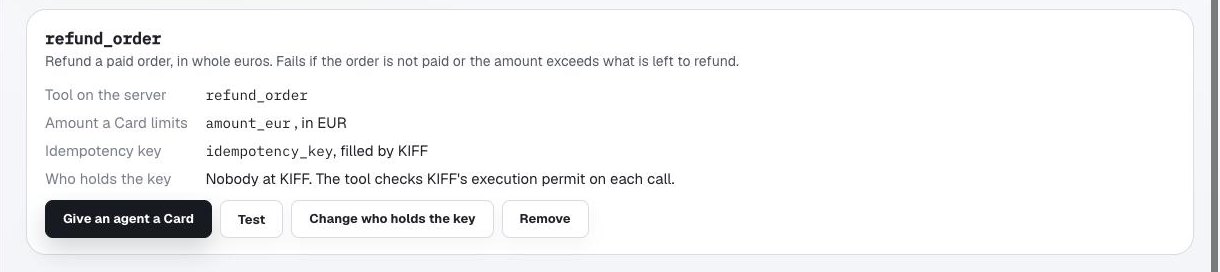
A connected tool, from a KIFF test account. The server URL is hidden.
3. Give the agent a Card
Add the agent on My agents if it isn’t there yet. Then, on the connected tool, choose Give an agent a Card. KIFF asks one thing per step:
- Which agent may use the tool? Pick it, or type its name.
- How much, and how often? A total, the most per call (if the tool has an amount argument) and a number of calls. Each one counts over Each day (from midnight in the Card’s time zone), Any 24 h, Any hour or Whole life (one total that never resets, for a job with an end date). Leave a limit empty for none of that kind.
- And past that? Hold it for an approver, with how long it waits for an answer (10 minutes by default, up to 7 days), or Refuse it. The Card shows this as Ask or Stop.
- Check the Card, then Issue the Card.
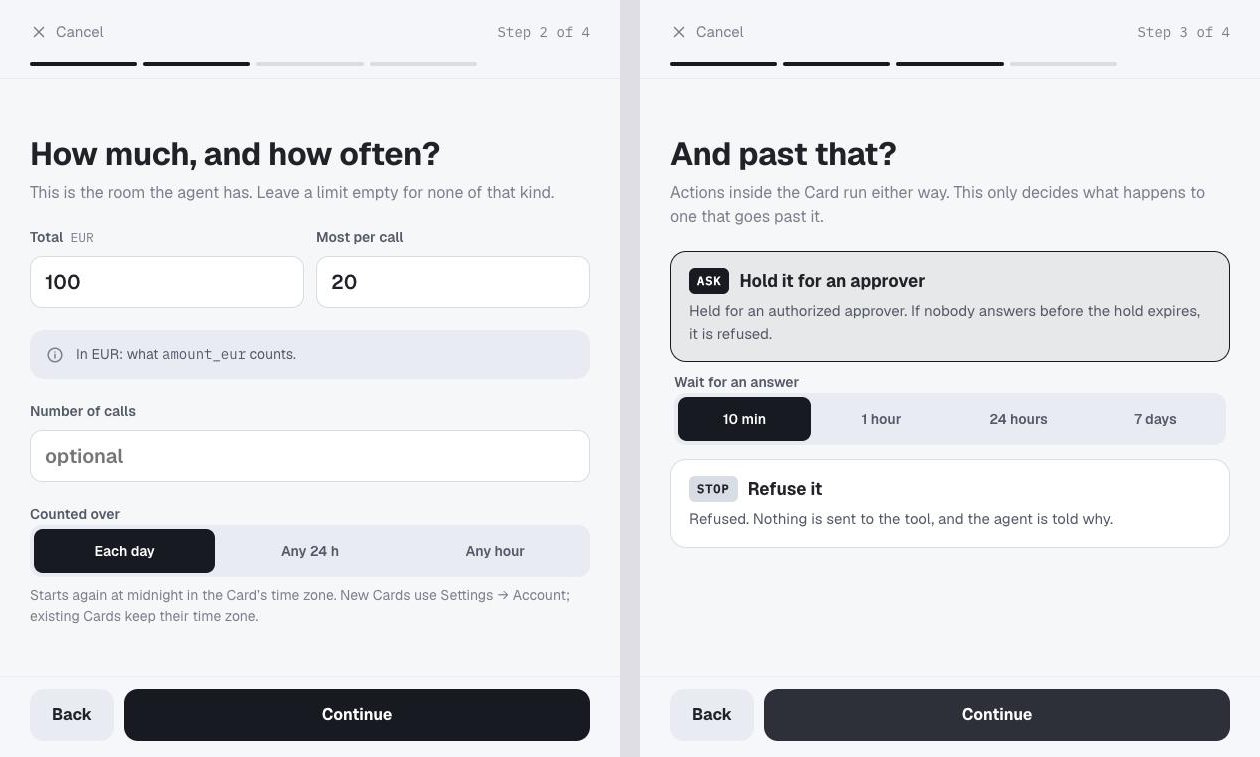
Steps 2 and 3 of the walkthrough, from a KIFF test account.
The Card is in force at once. Its page shows what is left and when the window starts again.
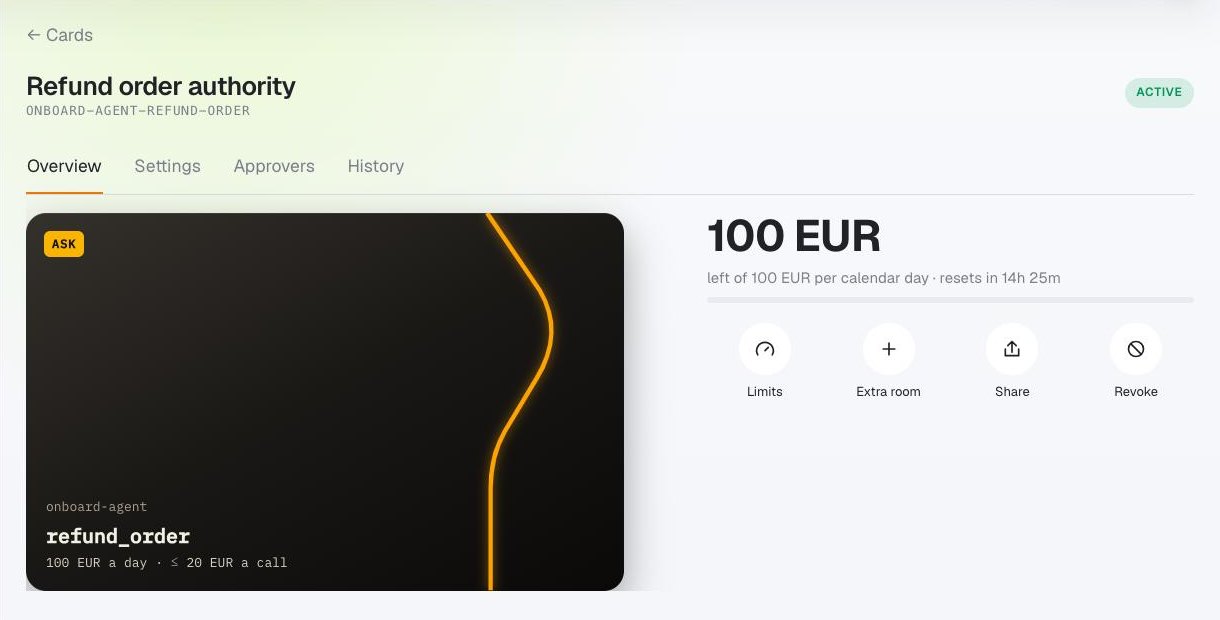
A Card’s Overview, from a KIFF test account.
4. Point the agent at KIFF
Open the agent on My agents and go to its Tools tab. Under How does it connect?, pick one:
- Claude Code or Codex, then Create the key and config. KIFF creates a key for this agent, which can ask for decisions and nothing else, and shows it once inside the configuration to paste.
- An app with sign-in, then Create a connect link. KIFF shows a
URL that names the agent. Add it to the app as a remote MCP server; the
first time, an admin or editor of the account signs in to KIFF and
allows it. No key is pasted anywhere. In Claude Code, add it with
claude mcp add --transport http kiff <link URL>, then sign in withclaude mcp login kiff(or/mcp, select kiff, then Authenticate).
Every gateway key and sign-in is listed on Connections, where you can revoke it.
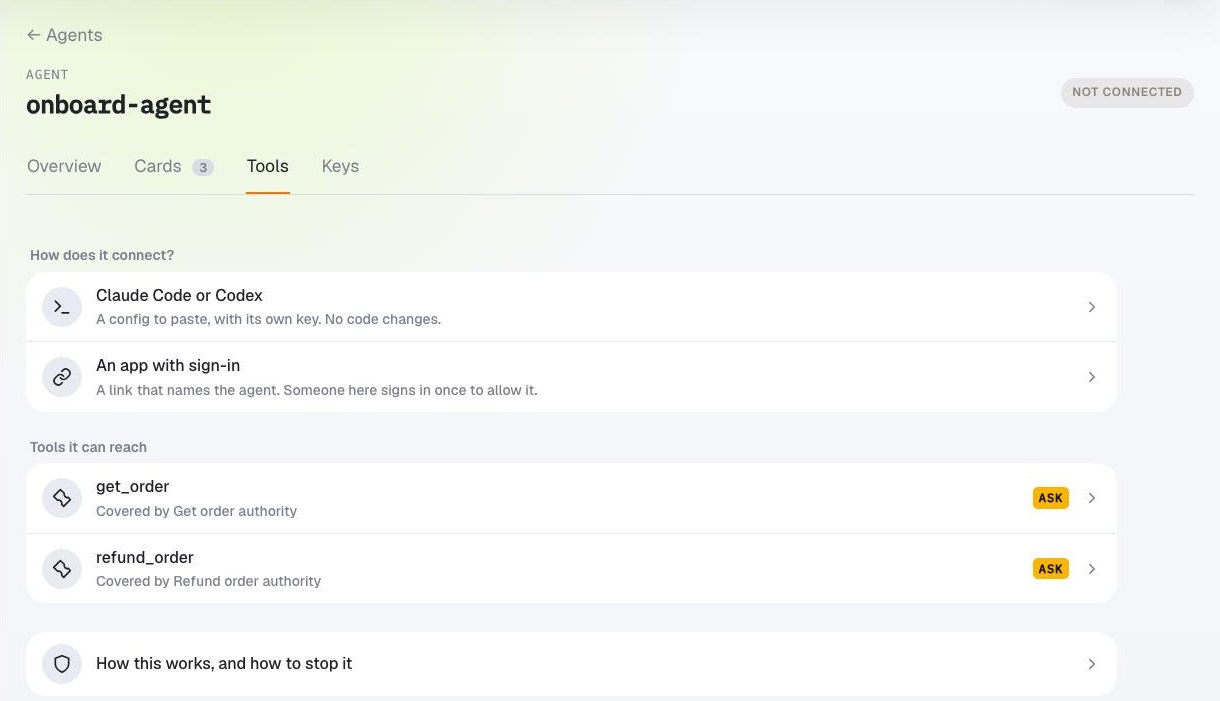
An agent’s Tools tab, from a KIFF test account.
With a key, the Claude Code configuration looks like this:
{
  "mcpServers": {
    "kiff": {
      "type": "http",
      "url": "https://mcp.kiff.dev/mcp",
      "headers": { "Authorization": "Bearer <the agent's key>" }
    }
  }
}
Keep the key out of anything you commit. If the agent can also reach the same tool directly, remove that access: the Card only binds calls that go through KIFF.
5. Use it, and go over the limit once
Ask the agent to use the tool. Calls inside the Card go through and return the tool’s own result. When a call goes over the Card:
- nothing is sent to the tool;
- the agent is told the call is waiting for you, with a link;
- you get an email, and the call appears on Needs you;
- in Claude Code, the chat also offers to open the link.
Open the link, signed in, and choose Approve once, Review extra room, or Reject. The agent retries the same call and gets your answer. If nobody answers in time, the call is refused and nothing is sent. See Held calls and approvals.
Approve once waives a per-action threshold and still charges the full call. A cumulative ceiling needs Review extra room, defaulting to This window only, or an explicit permanent budget revision. If an approved call no longer fits, it waits for room rather than running past the ceiling.
What you have now
- One Card that says what this agent may do with this tool, and how much.
- A record of every call on Activity, and the Card’s History: its decisions, its statement of every draw, and every change.
- A way to stop the agent: revoke its key or sign-in on Connections, or revoke the Card. Other agents keep their access.
Next
- What a Card can say → KIFF Cards.
- What people use Cards for → Cards in practice.
- Agents in your own code → Connect an agent.
- The gateway in detail, with its API → Use the KIFF MCP gateway.
- What KIFF does and does not do → What KIFF is.